
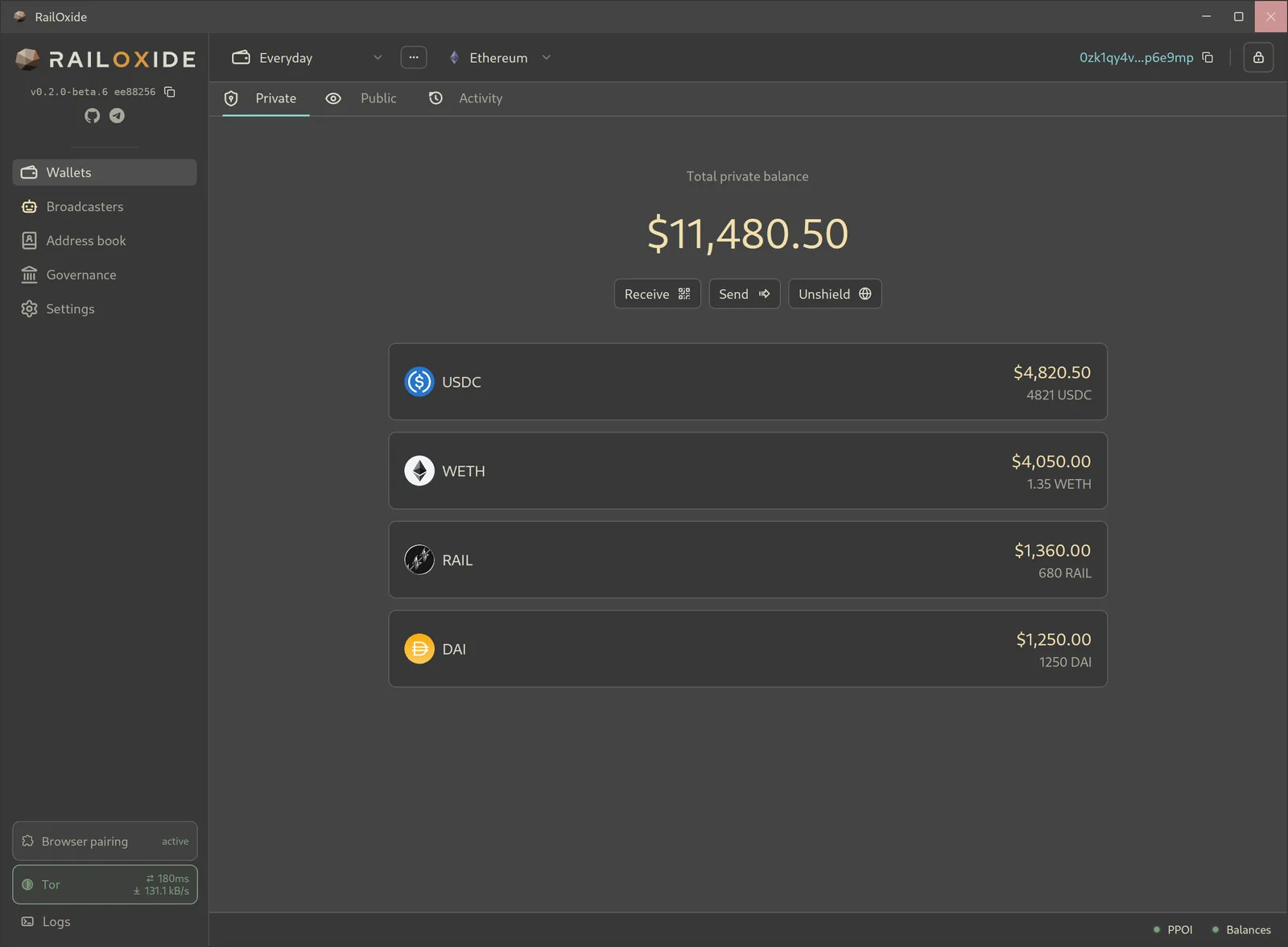
• Open source & auditable
  • Built-in Tor
  • Ledger & Trezor

The RAILGUN wallet that keeps to itself.

RailOxide is an open-source desktop wallet for RAILGUN, written in Rust with the GPUI framework. Shield, send, and unshield tokens privately. Wallet traffic goes through a built-in Tor client, and the app sends no telemetry.

Install for your platform
flatpak install --user https://triamazikamno.github.io/railoxide/flatpak/RailOxide.flatpakref

Includes Ledger and Trezor support. Want a build without USB access? Use the no-hardware variant.

curl -fsSL https://raw.githubusercontent.com/triamazikamno/railoxide/main/scripts/install-wallet | bash

Builds the latest release from source on macOS or Ubuntu/Debian. Read the script first.

irm https://raw.githubusercontent.com/triamazikamno/railoxide/main/scripts/install-wallet.ps1 | iex

Run it in PowerShell. It installs build tools with winget, then builds from source. Read the script first.

All install options · Latest release

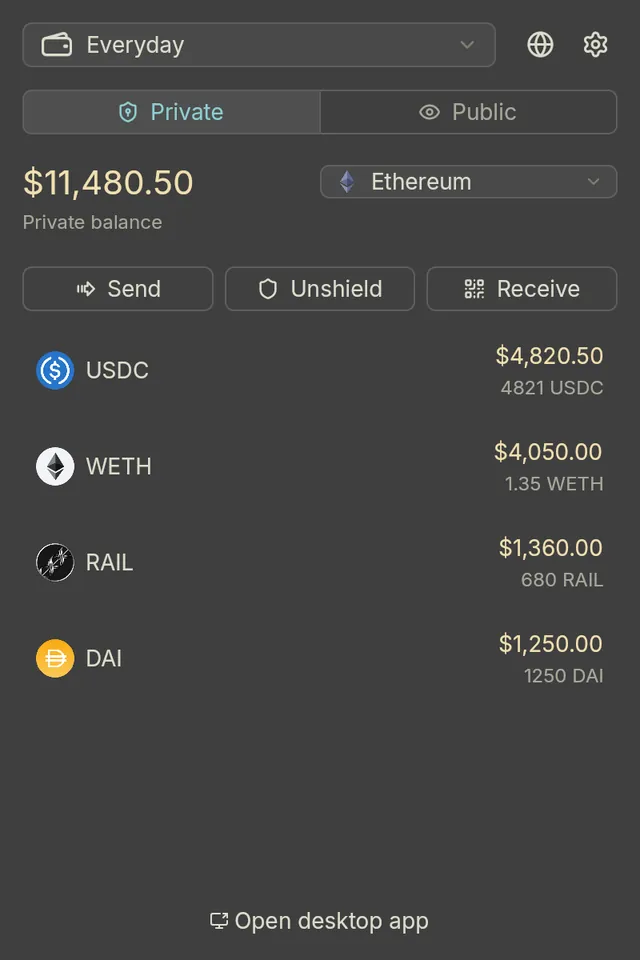
Desktop app and browser extension, same private wallet.

  • No telemetry

    No analytics, no crash reports, no calls home.

  • No added fees

    You pay the RAILGUN protocol fee and network costs. RailOxide takes nothing on top.

  • Tor built in

    Wallet HTTP and RPC traffic goes through a bundled Tor client. No system Tor needed.

  • Hardware wallets

    Ledger and Trezor for public accounts and hardware-derived private wallets.

  • Open source, auditable

    Every line is MIT-licensed Rust you can read, audit, and build yourself.

Shield · Send · Unshield

Private balances you can actually spend

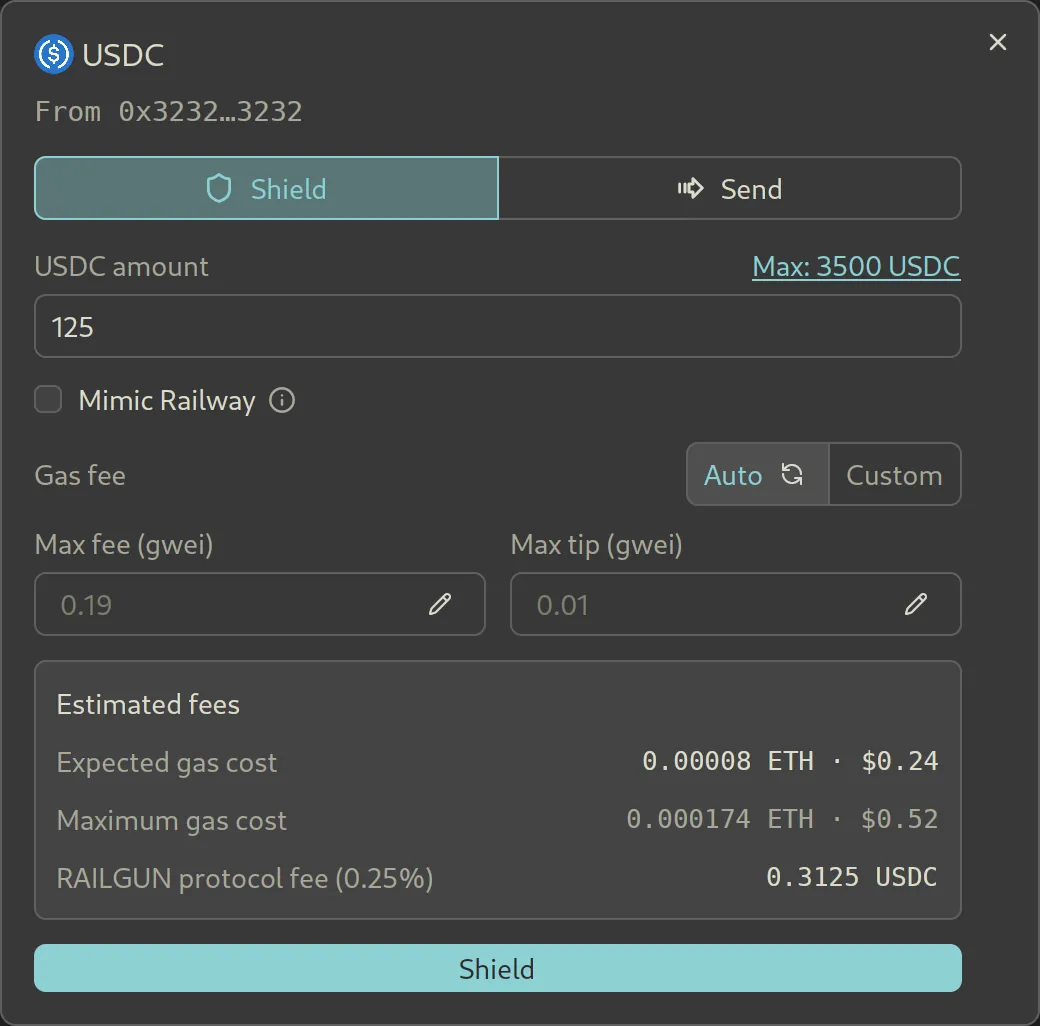
Shield tokens from any public account into your private 0zk balance. From there, send to other 0zk addresses or unshield to a public address. Every form shows estimated gas and fees before you submit.

  • RailOxide adds no fees of its own. Shielding and unshielding cost the RAILGUN protocol fee plus gas or a broadcaster's fee, and nothing else.
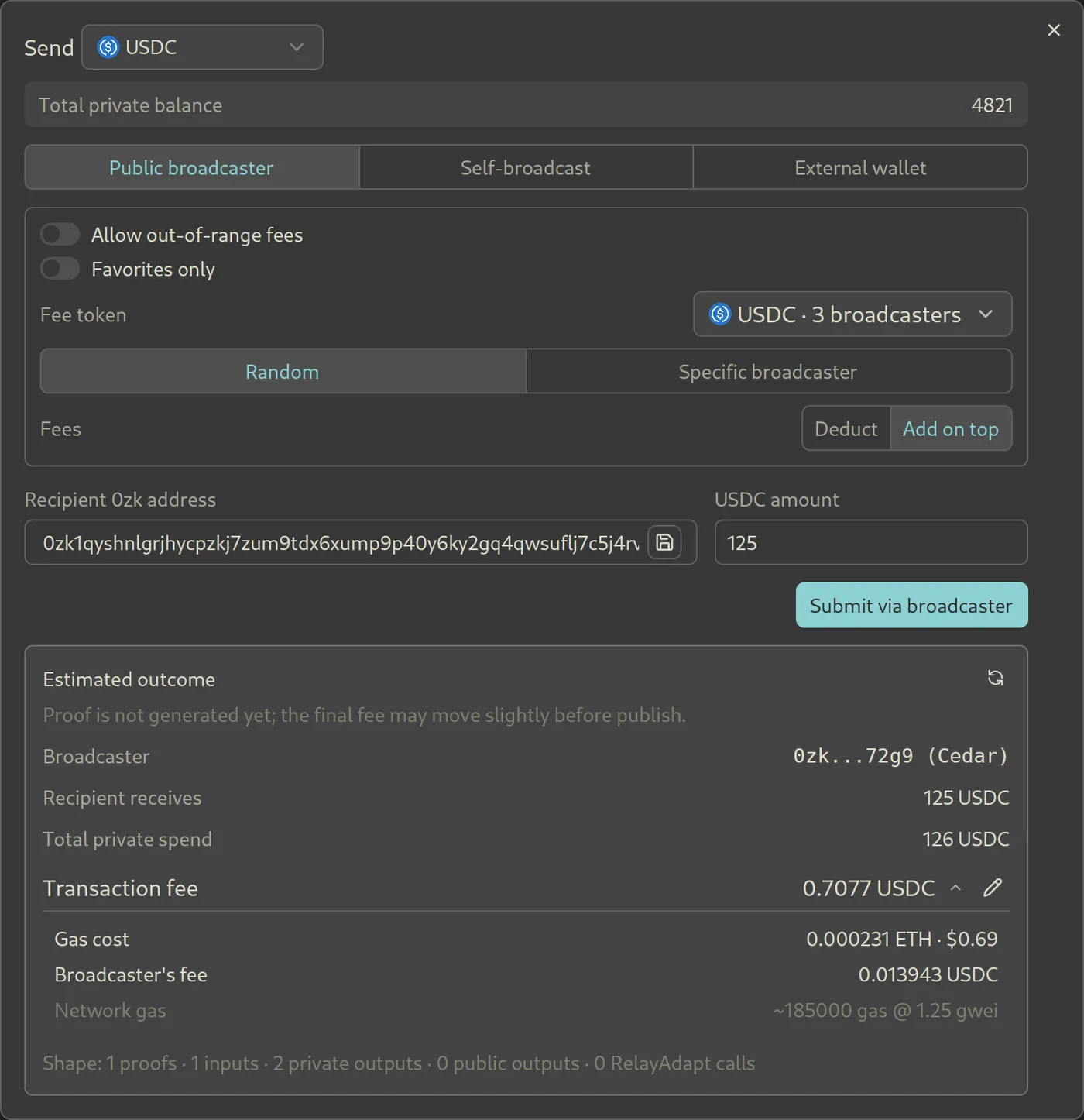
  • Pay through a public broadcaster, broadcast the transaction yourself, or hand it to an external wallet.
  • Broadcasters are compared by estimated fee. Prices come from on-chain Chainlink oracles, which also flag broadcasters asking for suspicious fees.
  • On Ethereum mainnet, block-builder sponsored self-broadcasting sends private transactions from an empty or underfunded account, with no public broadcaster involved.
  • Unshield wrapped tokens as native ETH if you prefer.
Send dialog for USDC with Public broadcaster, Self-broadcast, and External wallet options, a recipient 0zk address, and an estimated outcome listing gas cost, broadcaster fee, and total private spend.
Private send with a fee breakdown
Shield dialog for 125 USDC from public account 0x3232…3232, with gas settings, expected and maximum gas cost, and the 0.25% RAILGUN protocol fee.
Shield 125 USDC from a Ledger account

Tor by default

Your RPC provider doesn't need your IP address

RailOxide ships its own Tor client and routes wallet HTTP and RPC traffic through it from the first launch. You can switch to your own proxy, or to direct mode if you accept that remote services will see your address.

  • POI checks run against a local cache, so the commitments you're about to spend never go to a POI operator.
  • Proxy mode turns off the embedded Waku transports, so nothing bypasses your proxy.
  • Requests are batched hard to stay under RPC rate limits.
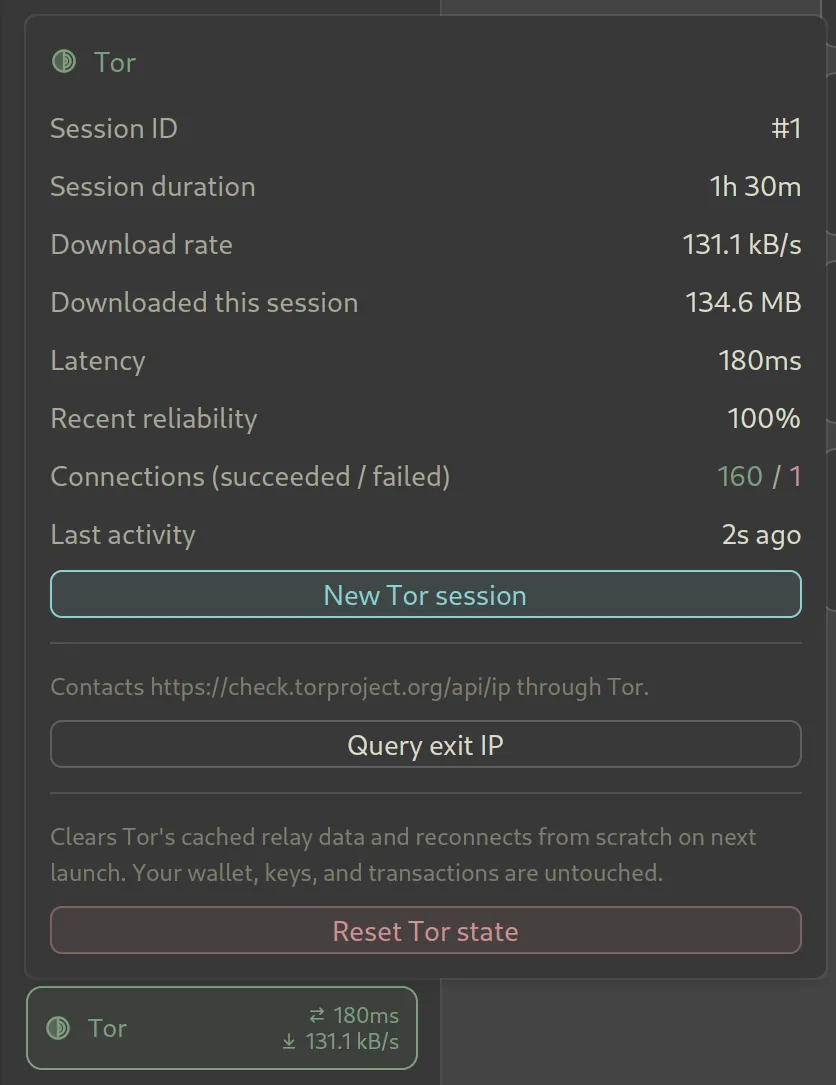
  • The Tor panel shows session time, latency, and throughput. Start a new Tor session or check your exit IP from there.

Read the privacy model →

Tor popover listing session ID, session duration, download rate, latency, reliability, and connection counts, with New Tor session, Query exit IP, and Reset Tor state buttons.
Tor session details

Indexed sync

Fast sync from snapshots anyone can verify

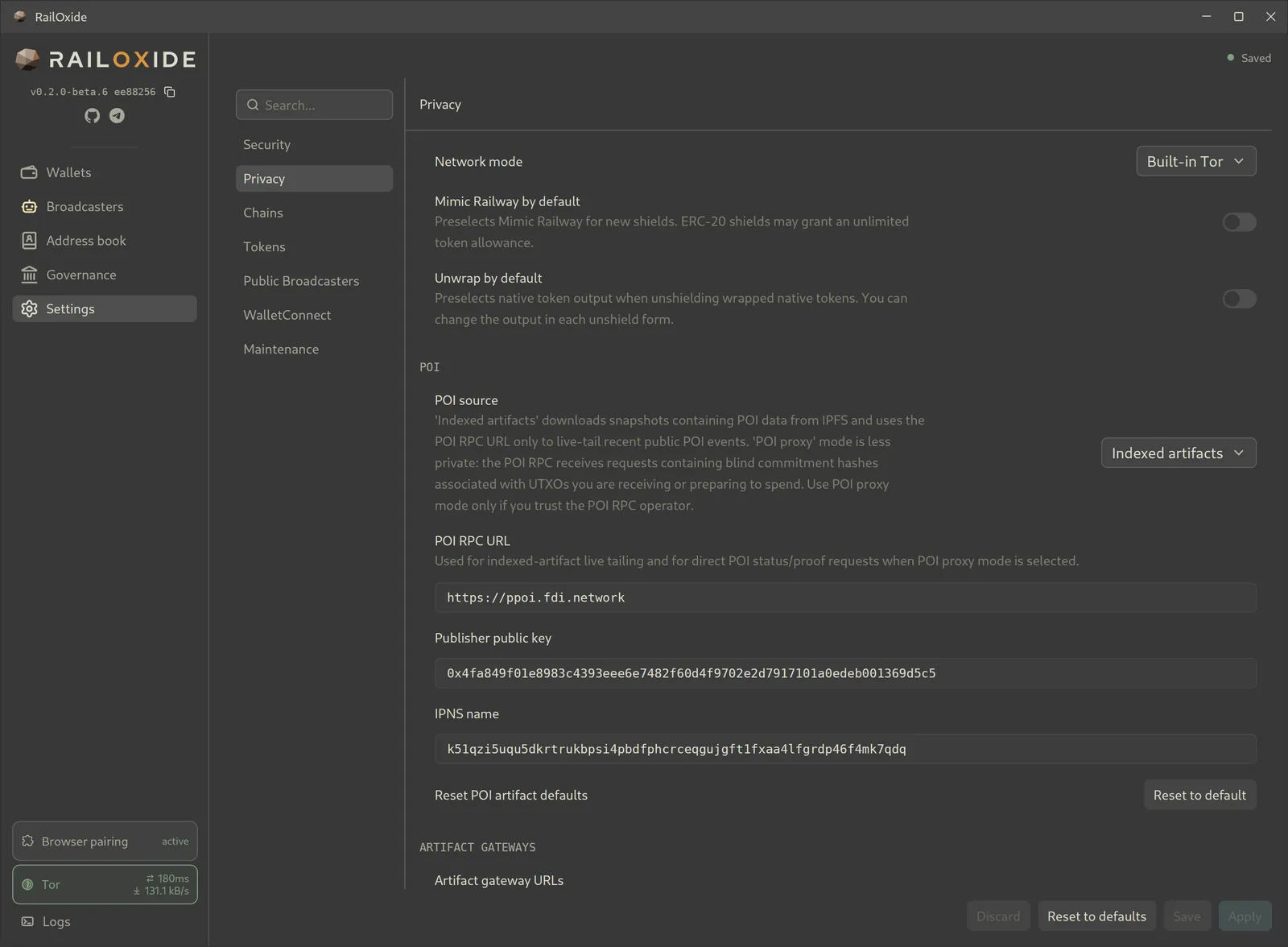
Instead of replaying every RAILGUN event over RPC, RailOxide downloads prebuilt snapshots of the commitment trees and POI data, then fills in the latest blocks from RPC. Sync starts as soon as one RPC responds and pulls from RPCs and indexers in parallel.

  • Snapshots come from IPFS, where every file is addressed by its hash. The wallet checks the publisher's signature and recomputes each Merkle root before using any of it, so a gateway can't slip in altered data.
  • Snapshot downloads go through Tor, like the rest of the wallet's traffic.
  • Prefer not to rely on our publisher key? Run your own railgun-indexer and point the wallet at your key and IPNS name.

railgun-indexer on GitHub →

Privacy settings page with network mode set to Built-in Tor and POI source set to Indexed artifacts, with fields for the POI RPC URL, the artifact publisher's public key, and its IPNS name.
Indexed artifact settings: publisher key and IPNS name

Ledger · Trezor

Bring your Ledger or Trezor

Public accounts on a Ledger or Trezor sign on the device. You can also derive a RAILGUN private wallet from either device, so the device holds your recovery.

How hardware-derived private wallets work

The device signs a derivation request, and RailOxide builds your private wallet from that signature. The app never stores the private keys, but they sit in memory briefly while it signs a RAILGUN transaction. On-device private signing will follow once hardware vendors add RAILGUN's cryptography to their firmware.

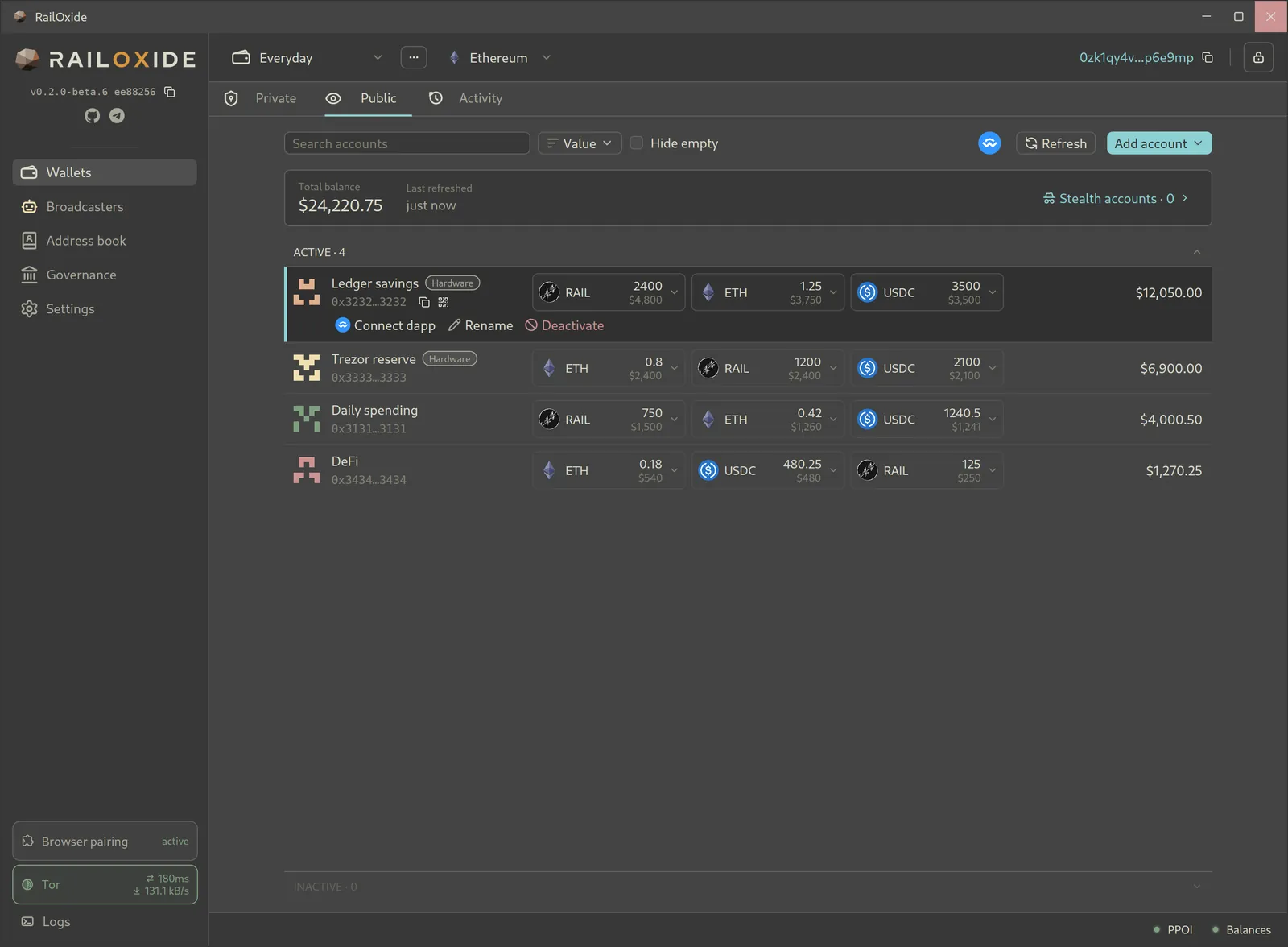
  • Name your public accounts and see balances across all of them in one list.
  • Connect any public account to dapps through WalletConnect.
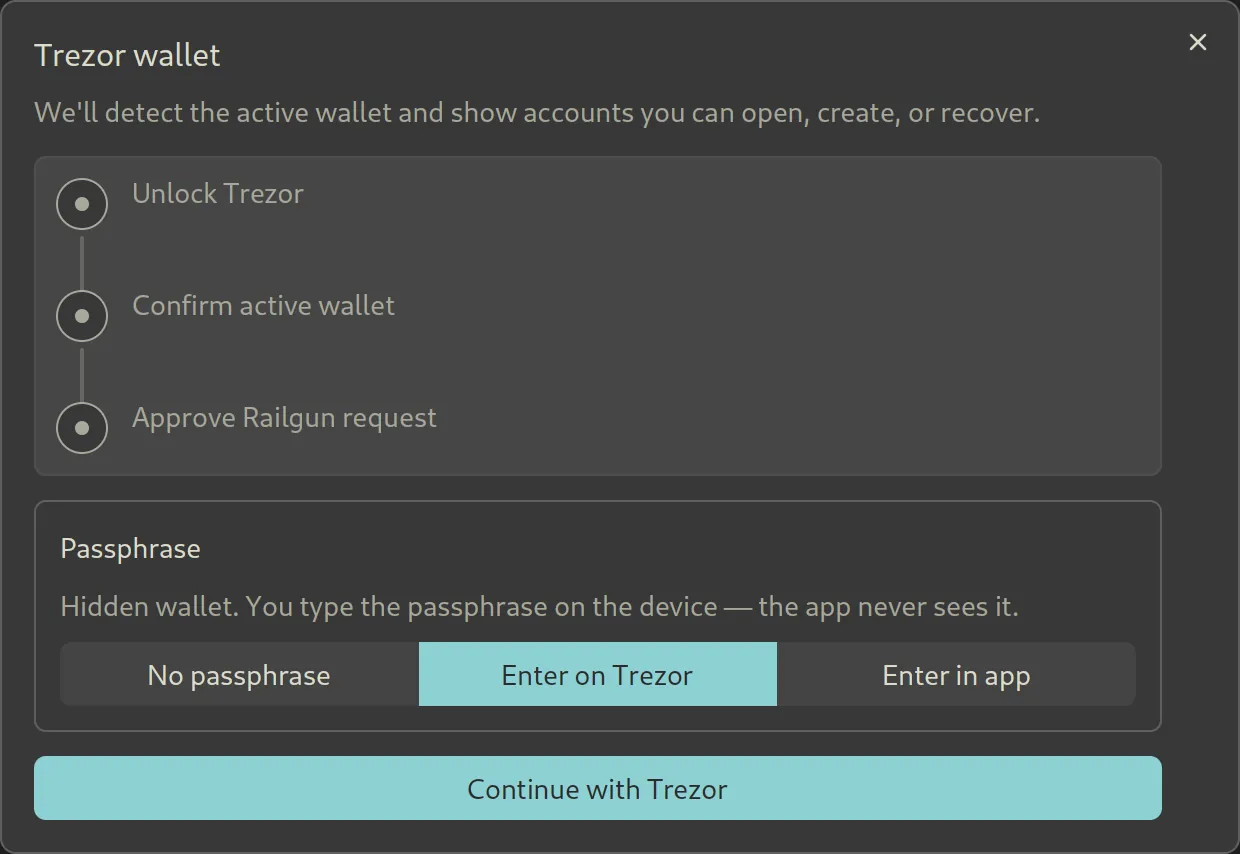
  • Trezor passphrases: none, typed on the device, or entered in the app.
Public accounts list with a Ledger savings account, a Trezor reserve account, and two software accounts, each showing token balances and a USD total.
Software, Ledger, and Trezor accounts side by side
Trezor wallet setup dialog with steps to unlock the device, confirm the active wallet, and approve the RAILGUN request, plus passphrase options: none, enter on Trezor, or enter in app.
Unlock your Trezor wallet and choose where to enter its passphrase

RailOxide Gateway · browser extension

Use dapps in your browser. Approve on your desktop.

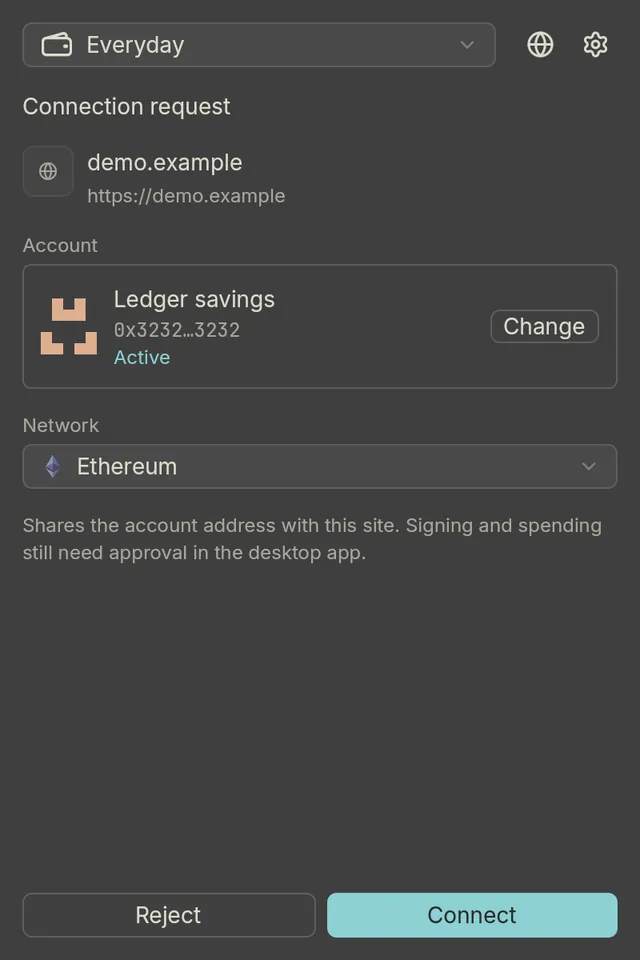
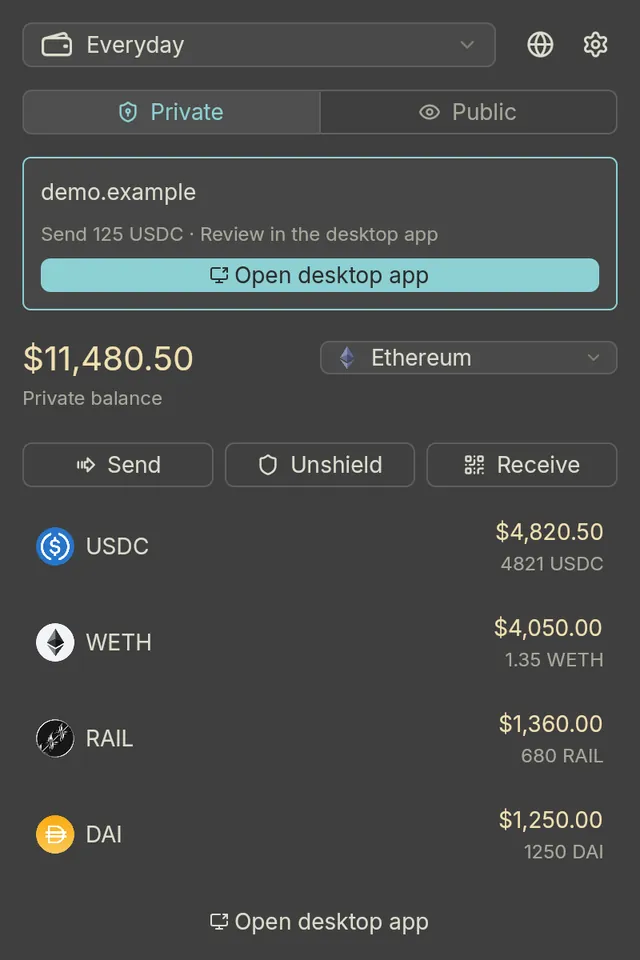
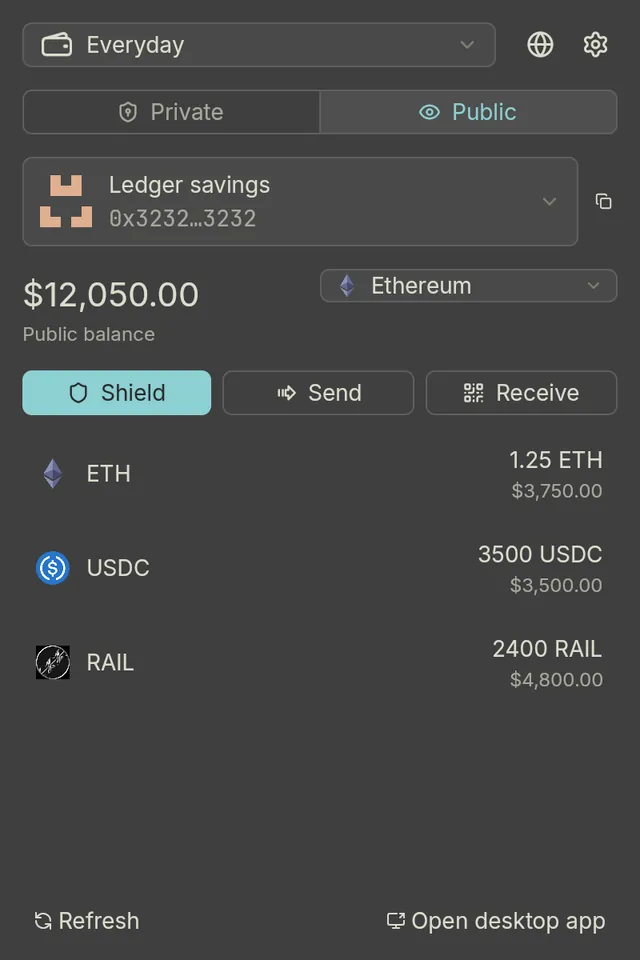
The companion extension connects dapps to your RailOxide wallet. It shows your private and public balances but holds no keys. Every signature and every spend goes to the desktop app for review.

  1. Turn on the browser gateway in the desktop app and install the extension from the page it serves.
  2. Pair your browser with the 6-digit code shown on the desktop.
  3. Pick RailOxide in a dapp's wallet list. Requests wait in the extension until you approve them on the desktop.
Extension popup showing a connection request from demo.example for the Ledger savings account on Ethereum, with Reject and Connect buttons.
Connection request
Extension popup with a pending request from demo.example to send 125 USDC, marked for review in the desktop app, with an Open desktop app button.
Waiting for desktop approval
Extension popup on the Public tab for the Ledger savings account, showing a $12,050.00 balance in ETH, USDC, and RAIL with Shield, Send, and Receive buttons.
Public balances
  • Dapps find it through EIP-6963, so it sits next to Brave Wallet without replacing it.
  • Older dapps can opt in to window.ethereum or MetaMask compatibility. Both are off by default.
  • Connecting shares one account address. Signing and spending still need your approval on the desktop.
  • Tested with Brave on Chromium 120 or later.

Extension guide →

DAO voting & staking

Vote on RAILGUN DAO proposals, stake, and claim rewards

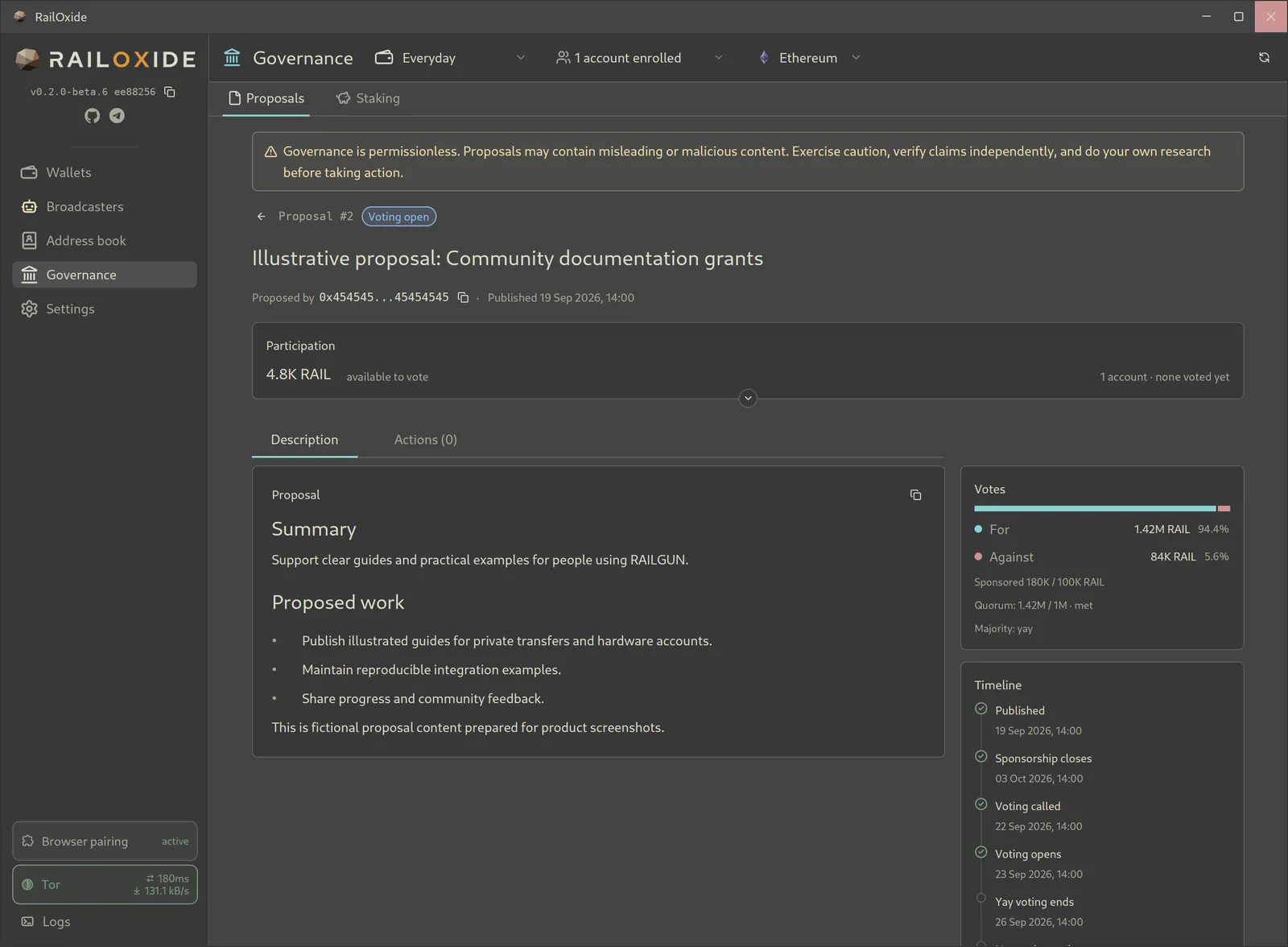
RailOxide reads RAILGUN DAO proposals on-chain. Sponsor proposals, call votes, and vote from your enrolled accounts, hardware accounts included.

  • Each proposal shows its description, on-chain actions, vote totals, quorum, and timeline.
  • Stake RAIL, delegate or undelegate voting power, and unlock positions.
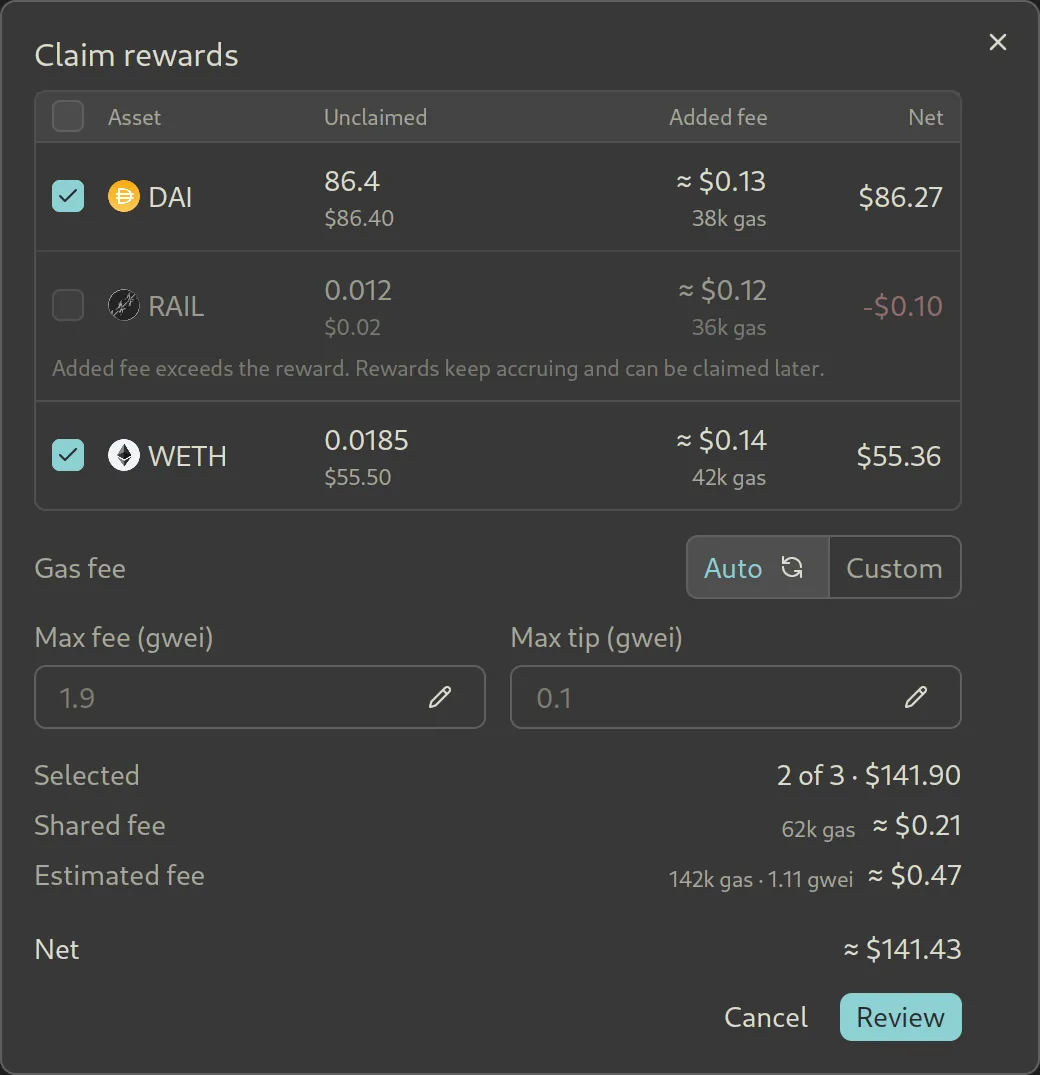
  • Claim rewards token by token. Each token shows the gas it adds, so you can skip a reward that costs more to claim than it's worth.
Governance proposal detail with a permissionless-governance warning, the proposal description, For and Against vote totals, quorum, and a timeline from publication to voting.
Proposal details, votes, and timeline
Claim rewards dialog listing DAI, RAIL, and WETH rewards with the added gas fee and net value of each; RAIL is unchecked because its fee exceeds the reward.
Pick which rewards are worth claiming
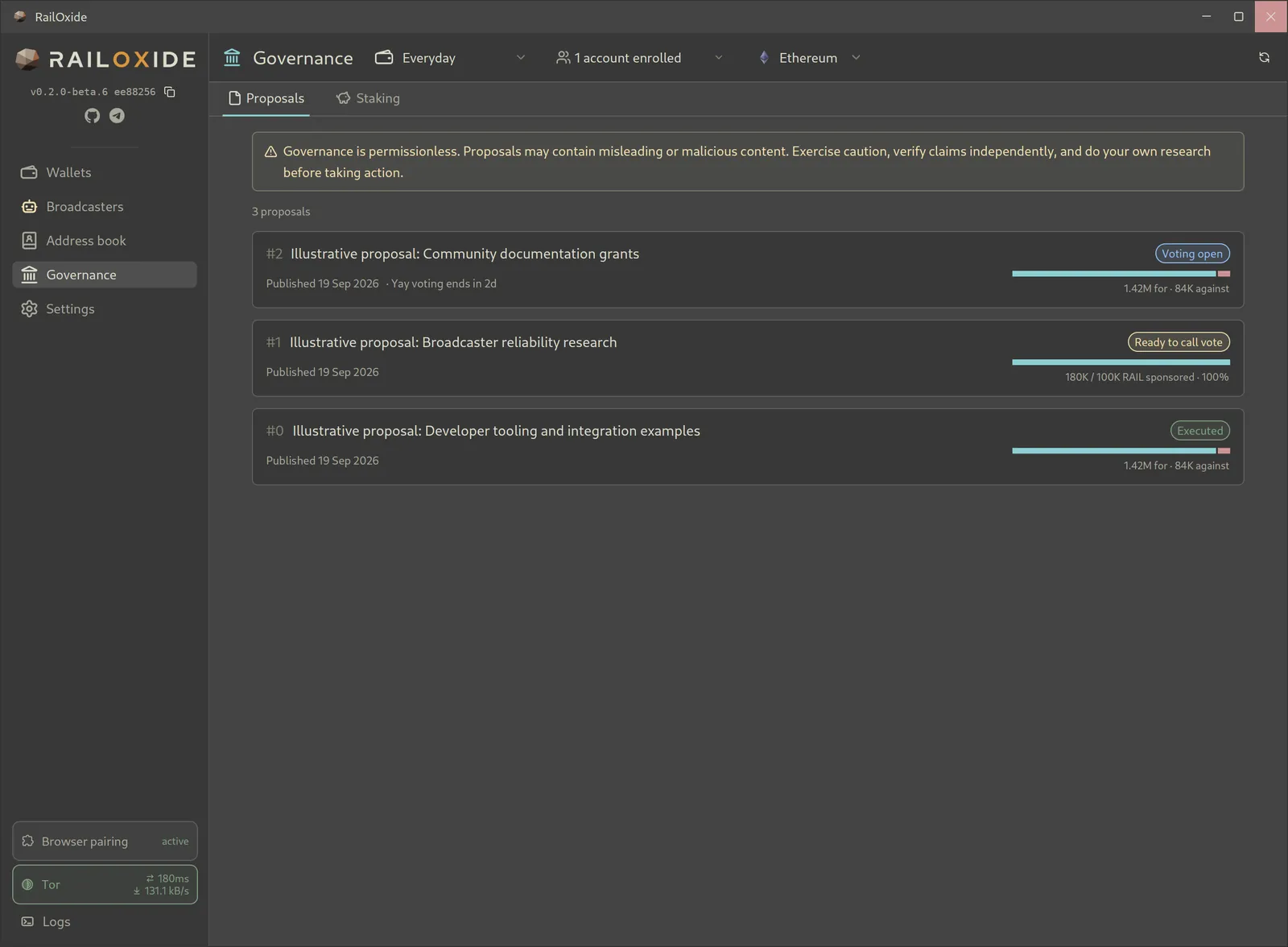
Governance proposal list with three proposals marked Voting open, Ready to call vote, and Executed, each with a vote or sponsorship bar.
Proposal list
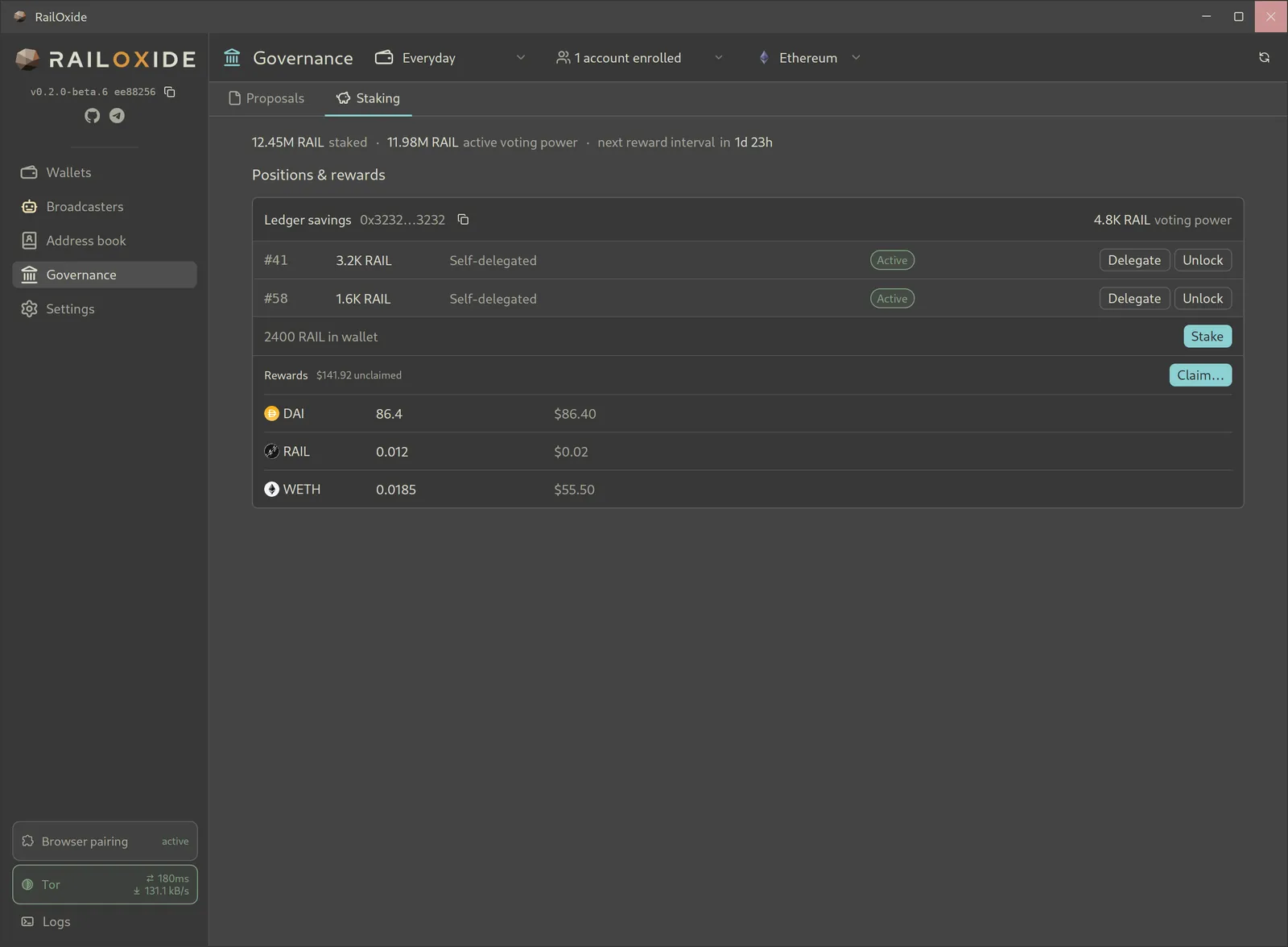
Staking tab showing two self-delegated RAIL positions with Delegate and Unlock buttons, RAIL available to stake, and unclaimed DAI, RAIL, and WETH rewards.
Positions and rewards

More in the box

  • Many chains

    Preset public chains, plus custom public-only chains you add yourself.

  • WalletConnect

    Use public accounts with DeFi apps.

  • Address book

    Save 0zk and public addresses under names you'll recognise.

  • Activity

    Per-wallet history, down to individual UTXOs.

  • Price oracles

    Configurable native-token price oracles, read on-chain.

  • Broadcaster network

    Resilient Waku connections with configurable backup peers.

How it's built

Native code from the UI down to the Tor client.

  • Rust

    The desktop app, the extension, and the RAILGUN protocol crates are all Rust.

  • GPUI

    The GPU-accelerated UI framework from the Zed editor. RailOxide renders its whole interface with it, no web view.

  • WebAssembly

    The browser extension is Rust compiled to WebAssembly, sharing code with the desktop app.

  • Arti

    The Tor Project's Rust implementation of Tor, built into the wallet. No system Tor daemon needed.

Install RailOxide

Pick the method that fits your system. Every option builds from or ships the same open-source code.

Flatpak · Linux Recommended

With Ledger and Trezor support

flatpak install --user https://triamazikamno.github.io/railoxide/flatpak/RailOxide.flatpakref

Without hardware-wallet support (no USB access)

flatpak install --user https://triamazikamno.github.io/railoxide/flatpak/RailOxide-NoHardware.flatpakref

Install one variant at a time. They share an app ID, data directory, and signed update repository.

Flatpak guide →

Installer · macOS, Ubuntu, Debian

curl -fsSL https://raw.githubusercontent.com/triamazikamno/railoxide/main/scripts/install-wallet | bash
Inspect the script first
curl -fsSLO https://raw.githubusercontent.com/triamazikamno/railoxide/main/scripts/install-wallet
less install-wallet
bash install-wallet

Defaults to the latest GitHub release. Pass --main, --ref <tag>, or --no-hardware to change that.

Installer options →

Installer · Windows

irm https://raw.githubusercontent.com/triamazikamno/railoxide/main/scripts/install-wallet.ps1 | iex
Inspect the script first
iwr https://raw.githubusercontent.com/triamazikamno/railoxide/main/scripts/install-wallet.ps1 -OutFile install-wallet.ps1
notepad .\install-wallet.ps1
powershell -ExecutionPolicy Bypass -File .\install-wallet.ps1

Installs missing build tools with winget and adds a Start Menu shortcut.

Build with Cargo

cargo build --release -p wallet --features hardware

Needs Rust 1.97.1 or newer and your platform's C/C++ build tools.

Browser extension

The installers, Flatpak, and Nix builds embed the extension. In the desktop app, open Browser pairing, turn on Enable browser gateway, and choose Install extension… to get a page you can open in the browser you want to pair.

Extension guide →